
Last updated on
Nov 9, 2026
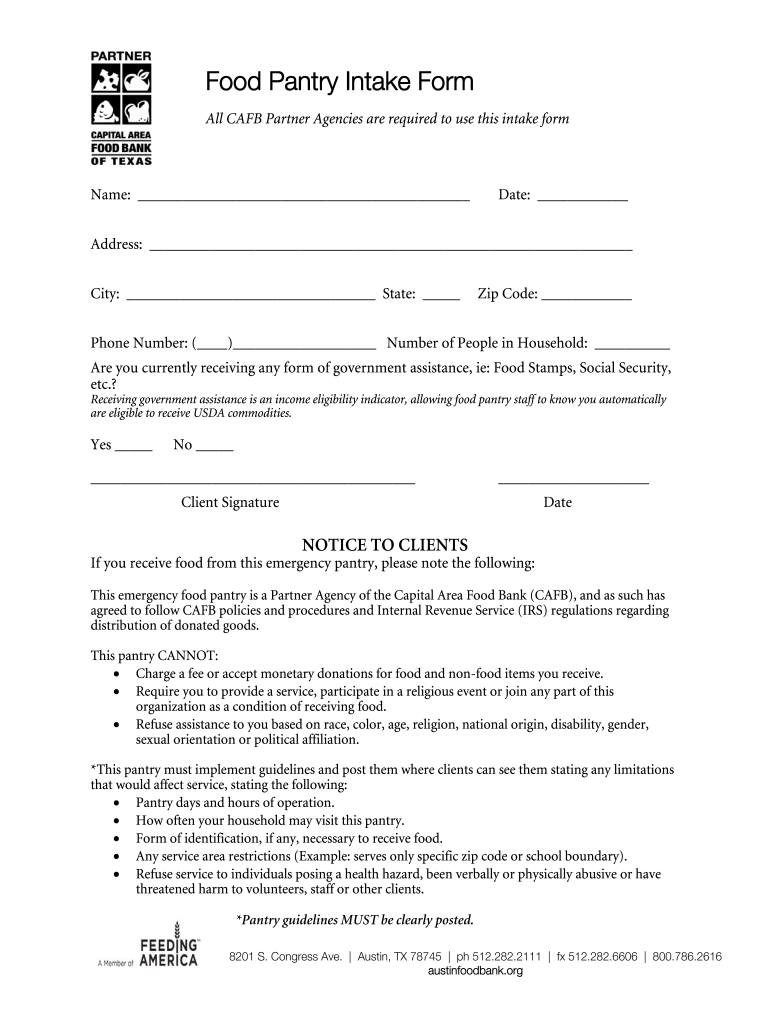
TX CAFB Food Pantry Intake Form free printable template
pdfFiller is not affiliated with any government organization

Fill out
Complete the form online in a simple drag-and-drop editor.

eSign
Add your legally binding signature or send the form for signing.

Share
Share the form via a link, letting anyone fill it out from any device.

Export
Download, print, email, or move the form to your cloud storage.
Why pdfFiller is the best tool for your documents and forms


End-to-end document management
From editing and signing to collaboration and tracking, pdfFiller has everything you need to get your documents done quickly and efficiently.
Accessible from anywhere
pdfFiller is fully cloud-based. This means you can edit, sign, and share documents from anywhere using your computer, smartphone, or tablet.
Secure and compliant
pdfFiller lets you securely manage documents following global laws like ESIGN, CCPA, and GDPR. It's also HIPAA and SOC 2 compliant.
What is TX CAFB Food Pantry Intake Form
The Food Pantry Intake Form is a personal financial document used by clients to provide information for food assistance from CAFB Partner Agencies.
pdfFiller scores top ratings on review platforms




The best way to fill in a PDF form , Kudos PDFille
Totally worth the money! You can upload pdf's that aren't fillable and make them fillable. There are also tens of thousands of pdf documents available for downloading - not just forms, but also sample motions and briefs actually filed in court. So it's also a great tool for research.
Who needs TX CAFB Food Pantry Intake Form?
Explore how professionals across industries use pdfFiller.

TX CAFB Food Pantry Intake Form is needed by:
-
Individuals seeking food assistance
-
Clients of food pantries in Texas
-
Non-profit organizations providing food aid
-
Social workers assisting clients with food needs
-
Volunteers at community food programs
Comprehensive Guide to TX CAFB Food Pantry Intake Form
What is the Food Pantry Intake Form?
The Food Pantry Intake Form serves as a critical tool for collecting essential information from individuals seeking food assistance. This form facilitates the intake process by gathering data such as personal details and household size, which are vital for assessing eligibility for food aid programs. Understanding eligibility indicators, particularly those related to government assistance, is crucial for clients in Texas.
Why Use the Food Pantry Intake Form?
Utilizing the Food Pantry Intake Form streamlines the intake process for food pantries, ensuring efficiency and accuracy in service delivery. By collecting comprehensive client information, the form helps verify eligibility, ultimately enhancing the effectiveness of food assistance programs. Compliance with IRS guidelines and other regulations further emphasizes the necessity of this form for food assistance agencies.
Key Features of the Food Pantry Intake Form
-
Fillable fields for Name, Address, Phone Number, and Household Size.
-
A checklist to indicate the receipt of government assistance as part of the eligibility criteria.
-
A signature requirement that ensures client confirmation of the provided information.
Who Should Complete the Food Pantry Intake Form?
The Food Pantry Intake Form is designed for individuals and families seeking food assistance in Texas. This includes those in urgent need of emergency food support. Furthermore, understanding eligibility criteria is essential for potential clients to navigate the assistance process effectively.
How to Fill Out the Food Pantry Intake Form Online
Filling out the Food Pantry Intake Form online involves several straightforward steps:
-
Access the form through the pdfFiller platform.
-
Carefully fill in each field, ensuring accurate submission of your personal details.
-
Refer to field-by-field guidance provided to avoid common errors.
Submission Process for the Food Pantry Intake Form
Once completed, there are various methods to submit the Food Pantry Intake Form:
-
Submit the form in-person at the designated food pantry location.
-
Alternatively, use the online submission option via pdfFiller.
Users can track their submission status and are advised on potential fees and processing times related to their applications.
Security and Privacy Considerations in Handling the Food Pantry Intake Form
Ensuring the security of data when using the Food Pantry Intake Form is of utmost importance. PDFfiller employs robust security measures, such as 256-bit encryption, to protect client information. Additionally, compliance with privacy regulations like HIPAA, GDPR, and SOC 2 Type II standards is maintained to safeguard sensitive data and ensure client confidentiality.
What to Do After Submitting the Food Pantry Intake Form
After submitting the Food Pantry Intake Form, users should take the following steps:
-
Monitor the application status online for timely updates.
-
Be aware of potential waiting periods and follow up as necessary.
-
Seek additional assistance if required during the waiting process.
How pdfFiller Enhances the Food Pantry Intake Form Experience
PDFfiller enhances the process of managing the Food Pantry Intake Form with features that include:
-
eSigning capabilities for convenient document completion.
-
Edit and secure storage options for effortless management.
-
A user-friendly interface that simplifies form completion for clients and agencies alike.
Get Started with the Food Pantry Intake Form Today
Users can quickly engage with the Food Pantry Intake Form via pdfFiller, emphasizing the ease of use and secure handling of their personal details. Taking the initial step toward receiving assistance is now more accessible than ever.
How to fill out the TX CAFB Food Pantry Intake Form
-
1.To access the Food Pantry Intake Form on pdfFiller, visit the pdfFiller website and search for 'Food Pantry Intake Form'. Click on the form to open it.
-
2.Once the form loads, familiarize yourself with the layout. Begin by clicking on the first field to enter your name. Use the tab key to navigate to the next fields.
-
3.Before completing the form, gather essential information such as your address, phone number, household size, and any details about government assistance you may receive.
-
4.Begin filling in the required information. Enter your name, address, city, state, zip code, and phone number in the designated fields.
-
5.If you receive government assistance, check the appropriate boxes as indicated on the form. Ensure that you provide accurate information as it impacts eligibility for aid.
-
6.After completing all necessary fields, review the information entered to confirm its accuracy. Double-check your contact details and household information.
-
7.Once you are satisfied with the details, find the signature line at the bottom of the form. Click on this area to add your electronic signature.
-
8.Finally, to save your completed form, click on the save icon or download button on pdfFiller. You can also submit your form online or print it out for mailing.

Who is eligible to fill out the Food Pantry Intake Form?
Eligible individuals include those seeking food assistance from CAFB Partner Agencies in Texas. Recipients of government assistance are specifically encouraged to apply.
What do I need to submit with the Food Pantry Intake Form?
Typically, additional documents are not required; however, it is helpful to receive any relevant information regarding government assistance and household size to complete the form accurately.
Is there a deadline to submit the Food Pantry Intake Form?
While specific deadlines may vary by pantry, it is advisable to submit your form as soon as possible to ensure timely assistance. Contact your local pantry for specific timelines.
How do I submit the Food Pantry Intake Form once completed?
You can submit the completed form electronically through pdfFiller, print it for mailing, or deliver it directly to your local food pantry. Always confirm with the pantry on preferred submission methods.
What common mistakes should I avoid when filling out the form?
Ensure all required fields are filled accurately. Common mistakes include leaving sections blank, incorrect personal information, or failing to sign the form, which can result in processing delays.
How long does it take to process the Food Pantry Intake Form?
Processing times can vary by pantry. Generally, expect a response within a few days to a week. For urgent needs, contact the pantry directly for assistance.
Related Content
Related Forms



Related Catalogs
Get the latest insights from our blog


If you believe that this page should be taken down, please follow our DMCA take down process
here
.
This form may include fields for payment information. Data entered in these fields is not covered by PCI DSS compliance.